
Uncategorized
How to Program Garage Door Remote

Sep
How to Program Garage Door Remote: 7 Easy Steps for Fast Results
Learning how to program garage door remote controls is useful when installing a new remote, replacing a lost remote, or reconnecting a compatible remote to a garage door opener. Although the general process is straightforward, the exact programming procedure can vary depending on the opener manufacturer, model, and remote system.
Before learning how to program garage door remote controls, identify the garage door opener and the remote you plan to use. Checking compatibility first can help prevent programming problems and ensure that the remote works correctly after installation.
This guide explains how to program garage door remote controls, how to identify the learn button, how to prepare a replacement remote, how to program common opener systems, and what to check when a remote does not respond after programming.

Before Programming a Garage Door Remote
Before starting how to program garage door remote instructions, identify the garage door opener brand and model. The model information is commonly found on a label attached to the opener housing.
If you still have the original remote, check its housing or battery compartment for a model number. This information can help determine whether the remote is compatible with the opener.
Having the correct information before programming makes the process easier because different opener systems can use different programming methods.
If you are replacing a lost, damaged, or defective remote, read our related guide: Garage Door Remote Replacement .
Check Garage Door Remote Compatibility
Compatibility is one of the most important parts of how to program garage door remote controls. A remote that looks similar to an existing remote is not necessarily compatible with the garage door opener.
Check the opener model and remote model before programming. If you are purchasing a replacement, compare the replacement remote’s compatibility information with your opener.
Programming cannot make an incompatible remote communicate with an opener. If the remote is not designed for the opener’s system, the programming procedure may fail even when the steps are performed correctly.
For this reason, always verify compatibility before starting the how to program garage door remote process.
How to Program Garage Door Remote
The basic process for how to program garage door remote controls involves putting the garage door opener into programming mode and then registering the compatible remote.
Step 1: Identify Your Garage Door Opener
Locate the manufacturer and model number of your garage door opener. This information helps determine the correct programming procedure.
Step 2: Prepare the Remote
Make sure the remote has a working battery. A weak battery can interfere with the signal and make programming unsuccessful.
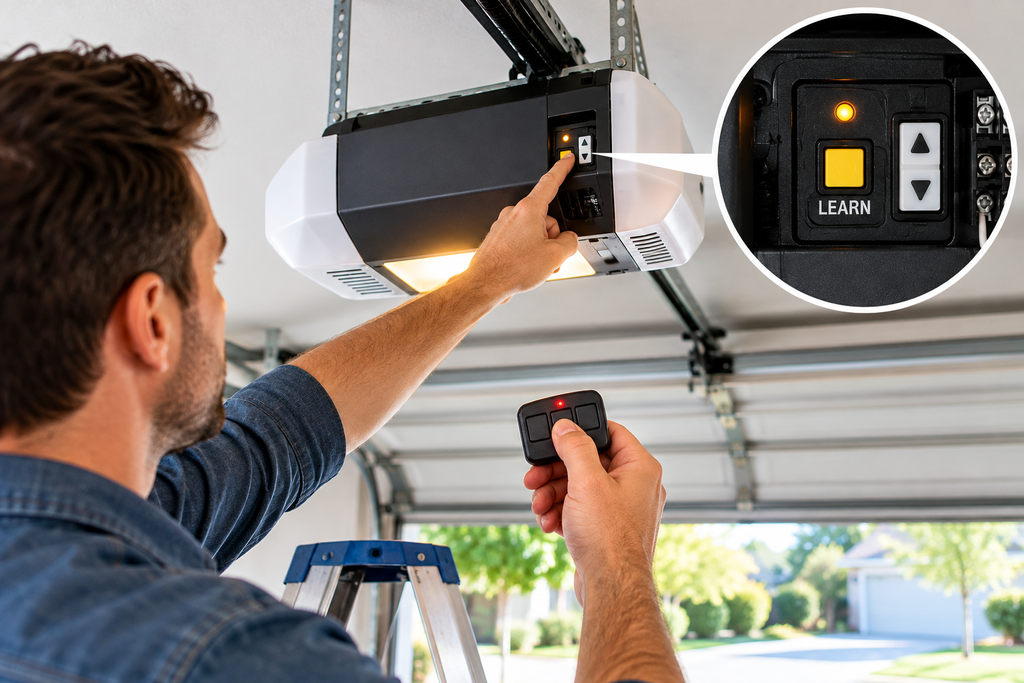
Step 3: Locate the Learn Button
Look for the learn, program, smart, or similarly labeled button on the garage door opener. The exact location varies by manufacturer and model.
Step 4: Activate Programming Mode
Press the appropriate programming button according to the instructions for your opener. An indicator light may show that the opener is ready to receive a remote signal.
Step 5: Press the Remote Button
Press the button on the remote that you want to use to operate the garage door. Follow the timing and button instructions for your specific opener.
Step 6: Watch for Confirmation
The opener may provide a visual indication that the remote has been accepted. Confirmation methods differ between opener systems.
Step 7: Test the Remote
After completing how to program garage door remote instructions, test the remote from a safe position with a clear view of the garage door.
Confirm that the opener responds correctly and that the remote works from the location where you normally use it.
Find the Learn or Program Button
Finding the correct learn button is an important part of how to program garage door remote controls. Depending on the opener, the button may be labeled Learn, Program, Smart, or another similar term.
The button may be located near the opener’s antenna wire, indicator light, or control panel. Because layouts vary, identify the opener model before pressing programming controls.
Avoid pressing unrelated buttons while trying to locate the programming control. Use the correct procedure for the opener model whenever possible.
Program a Replacement Garage Door Remote
If you purchased a replacement remote, the first step in how to program garage door remote setup is verifying compatibility.
A replacement remote should be selected according to the opener’s supported remote system rather than appearance alone.
If the original remote was lost, damaged, or no longer works, replacing it may restore convenient access once the compatible replacement has been programmed.
For additional information about choosing a replacement, read: Garage Door Remote Replacement .
Programming a LiftMaster Remote
If you have a LiftMaster opener, how to program garage door remote procedures depend on the specific LiftMaster opener and remote system.
Many LiftMaster systems use a learn or program function to register compatible remotes. However, the exact button sequence and confirmation process can vary between models.
Identify the LiftMaster opener model before beginning. This allows you to follow the appropriate programming procedure rather than using instructions intended for another system.
The supporting-blog cluster also includes: LiftMaster Remote Programming .
For LiftMaster wall buttons and controls, visit the main category and pillar: LiftMaster Wall Control .
Programming a Genie Remote
Genie garage door openers use their own remote and programming systems. If you have a Genie opener, identify the opener and remote model before beginning.
The general concept behind how to program garage door remote controls is similar across many systems, but the actual buttons and programming sequence can be different.
The supporting-blog cluster includes: How to Program Genie Garage Door Remote .
For manufacturer information, you can also consult the Genie remote and keypad programming resource .
Garage Door Wall Buttons and Controls
A handheld remote is only one type of garage door control. Wall buttons and control panels are commonly used inside the garage and can provide convenient access to opener functions.
When researching how to program garage door remote controls, it is important to distinguish between a handheld remote and an interior wall control. They can have different compatibility requirements and different programming procedures.
The main category and pillar for this Wall Buttons & Controls content cluster is: LiftMaster Wall Control .
Available products from the product list you provided include:
- LiftMaster 880LMW Smart Control Panel
- LiftMaster 889LM
- LiftMaster Wireless Wall Button
- Genie Series II Wall Console
- Marantec 165917 Wireless Wall Control
- Sommer 4765V001 Wireless Wall Button
- Wayne Dalton 309961 Wall Control
- Wall Control Garage Door Opener
Garage Door Remote Programming Troubleshooting
If you followed the steps for how to program garage door remote controls but the remote does not work, check the following areas.
Check Compatibility
Verify that the remote is compatible with the exact garage door opener model. Compatibility should be confirmed before repeating the programming procedure.
Check the Battery
Install the correct battery if the existing battery is weak. A low battery can prevent the remote from transmitting a reliable signal.
Repeat the Programming Process
Repeat the programming process carefully. Make sure the opener is actually in programming mode before pressing the remote button.
Check the Learn Button
Make sure you are using the correct learn or program button. Opener layouts vary by model.
Inspect the Remote
Check the remote for damaged buttons, cracked housing, corrosion, or other visible problems.
Common Programming Mistakes
Using an Incompatible Remote
One of the most common mistakes when learning how to program garage door remote controls is attempting to program a remote that is not compatible with the opener.
Ignoring the Battery
A weak battery can make a functional remote appear defective. Check the battery before replacing the entire remote.
Using the Wrong Instructions
Programming procedures differ between opener models. Do not automatically apply instructions for one manufacturer or model to another.
Not Testing the Remote
Always test the remote after programming. Confirm that the opener responds consistently before relying on the remote.
Related Supporting Blogs
This article is part of the Wall Buttons & Controls supporting-blog cluster. These are the eight supporting blogs for this cluster:
- How to Program Garage Door Remote
- Garage Door Remote Replacement
- Garage Door Remote Battery
- LiftMaster Remote Programming
- How to Program Genie Garage Door Remote
- Garage Door Keypad Replacement
- Genie Keypad Programming
- LiftMaster Wall Control Replacement
Frequently Asked Questions
How do I program a garage door remote?
To learn how to program garage door remote controls, identify the opener and compatible remote, locate the learn or program button, activate programming mode, register the remote, and test the remote. The exact procedure depends on the opener and remote model.
Why will my garage door remote not program?
Common causes include an incompatible remote, weak battery, incorrect programming sequence, incorrect button selection, or an issue with the garage door opener.
Do all garage door remotes program the same way?
No. Programming procedures can vary between manufacturers, opener models, remote systems, and generations. Use instructions appropriate for the specific equipment.
Can I program a replacement garage door remote?
Yes, provided the replacement remote is compatible with the garage door opener. The replacement remote must then be registered with the opener using the appropriate procedure.
Should I replace the battery before replacing the remote?
If the remote has reduced range or intermittent operation, checking the battery is a useful troubleshooting step before purchasing another remote.
Can a wall button replace a handheld remote?
Wall buttons and handheld remotes are different types of controls. Whether a particular wall control can operate an opener depends on compatibility.
Where can I find LiftMaster wall buttons and controls?
Visit the LiftMaster Wall Control category for wall buttons and controls.
Final Thoughts
Learning how to program garage door remote controls starts with identifying the opener and confirming that the remote is compatible. Checking the battery, locating the correct learn button, following the appropriate programming sequence, and testing the remote can help avoid common programming problems.
If your existing remote is lost or damaged, review the Garage Door Remote Replacement guide before selecting another remote.
For wall buttons and controls, the category below serves as the pillar page for this entire supporting-blog cluster: LiftMaster Wall Control .

Pingback: LiftMaster Wall Control Replacement: 7 Steps for a Better
Pingback: Genie Keypad Programming: 9 Steps for Easy Setup
Pingback: Garage Door Keypad Replacement: 7-Step Easy Installation