Uncategorized
LiftMaster remote programming
Sep
LiftMaster Remote Programming: 7 Easy Setup & Troubleshooting Tips
LiftMaster remote programming connects a compatible handheld remote to a LiftMaster garage door opener so the remote can operate the garage door. While the basic process is straightforward on many systems, the exact procedure can vary according to the opener model, remote model, Learn button, and control system.
Successful LiftMaster remote programming starts with identifying the equipment before pressing any programming buttons. Check the garage door opener model, remote model, battery condition, and Learn button so you can determine whether the remote is appropriate for the opener.
Before beginning LiftMaster remote programming, make sure the remote is designed for the opener you have installed. Using an incompatible remote can prevent the programming procedure from working even when the buttons are pressed correctly.
LiftMaster provides compatibility information for its remotes and keypads, including information based on the opener and Learn button. You can review the manufacturer’s current remote information here: LiftMaster Remotes and Keypads .

Prepare Before Programming
Good LiftMaster remote programming begins with identifying the equipment. Take a moment to check the opener model, remote model, battery condition, and Learn button before entering programming mode.
Identify the Garage Door Opener
Look at the opener housing for its model information. The model number is useful when checking which remote controls are supported by the system. Having this information available before starting LiftMaster remote programming can save time and help prevent compatibility problems.
Identify the Remote
Check the back, front, or battery compartment of the remote for its model number. Similar-looking LiftMaster remotes can belong to different technology families, so appearance alone should not be used to determine compatibility.
Check the Battery
A weak remote battery can cause unreliable transmission. If the remote is old, has been stored for a long time, or has already shown reduced range, install the correct battery before beginning LiftMaster remote programming.
Locate the Learn Button
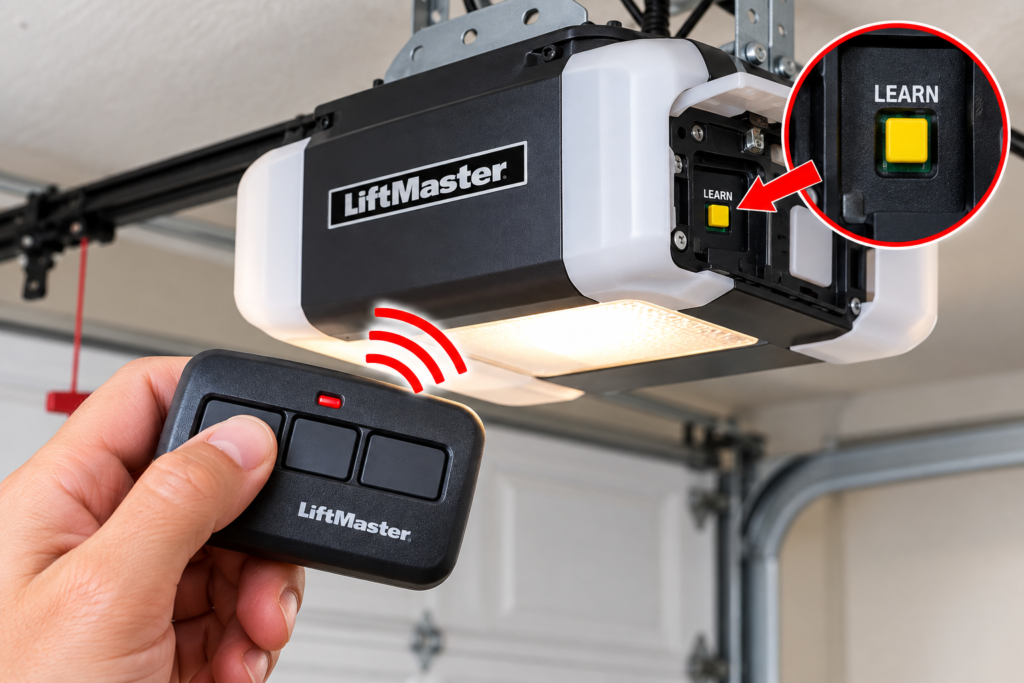
The Learn button is an important part of many LiftMaster programming procedures. Its location depends on the opener design, so inspect the opener rather than assuming every model places the button in exactly the same position.
Knowing where the Learn button is located makes the LiftMaster remote programming process easier because you will need to access the opener while keeping the remote nearby.
Understand the Learn Button
The Learn button places many compatible LiftMaster openers into a mode where they can receive a remote or accessory signal. Depending on the model, the button can be located beneath a light cover, near the antenna, or in another accessible area.
The Learn button color can also help identify compatible accessories. LiftMaster’s compatibility resources use Learn button information when helping customers select appropriate remotes.
Understanding the Learn button is especially useful when performing LiftMaster remote programming because the opener must normally be placed into an appropriate programming mode before it can recognize a new transmitter.
Why the Learn Button Matters
Without entering the appropriate programming mode, the opener will normally ignore a new remote signal. The Learn button therefore acts as the starting point for many remote-pairing procedures.
Learn Button Color
LiftMaster has used different Learn button colors across its opener systems. These colors can correspond with different remote technologies, which is why checking the button is useful when choosing an accessory.
When preparing for LiftMaster remote programming, note the Learn button color and compare it with the compatibility information for the remote you plan to use.
LiftMaster Remote Programming Steps
The following sequence describes the general approach used by many compatible systems. Your specific opener manual should take priority if it provides a different button sequence or timing requirement.
Step 1: Put the Remote Within Reach
Keep the remote close to the garage door opener. Make sure the battery is installed correctly and that the button you intend to use is clearly identified.
Step 2: Locate the Learn Button
Find the Learn button on the opener. If you cannot locate it, check the opener’s manual or manufacturer documentation for the exact location.
Step 3: Activate Programming Mode
Press the Learn button according to the instructions for your opener. An indicator light or other signal may show that the opener has entered programming mode.
Step 4: Select the Remote Button
Press the button on the remote that you want to use for operating the garage door. Depending on the opener, you may need to press the button once or hold it for a specified period.
Step 5: Watch for Confirmation
The opener may flash its lights, change an indicator, or provide another confirmation signal when the remote has been accepted.
Step 6: Test the Remote
Move to a suitable position and press the programmed button. The garage door should respond if the pairing was completed successfully.
Step 7: Repeat Only When Necessary
If the first attempt does not work, review the model-specific instructions before repeating the process. Repeatedly pressing buttons without following the correct sequence can make troubleshooting more difficult.
For many compatible openers, LiftMaster remote programming uses the Learn button to place the opener into programming mode before the remote button is selected. The confirmation method and exact timing remain model-specific.
LiftMaster documentation provides model-specific programming instructions, so consult the appropriate manual when your opener requires a particular sequence: View a LiftMaster opener manual .
Confirm the Remote Was Programmed
Successful LiftMaster remote programming normally produces a confirmation from the opener. The exact signal depends on the model.
Some systems use flashing opener lights, an indicator LED, an audible response, or another confirmation signal. After receiving confirmation, test the remote from a normal operating position.
The final test is whether the garage door responds consistently when the programmed button is pressed. If it does not respond, continue with compatibility and troubleshooting checks rather than immediately replacing the opener.
A successful response confirms that the remote and opener are communicating correctly after LiftMaster remote programming.
Program Additional Remotes
A household may need more than one remote. Different drivers may keep separate remotes in different vehicles, for example. Compatible LiftMaster openers can support additional remotes, subject to the capacity and technology of the particular opener.
Each additional remote should be checked for compatibility before programming. Use the appropriate pairing process for that opener, then test each remote independently.
If one remote works while another does not, compare the model numbers and battery condition. This can help determine whether the issue is related to the individual remote rather than the opener.
When adding another compatible transmitter, repeat the appropriate LiftMaster remote programming procedure instead of changing the opener settings unnecessarily.
Check LiftMaster Remote Compatibility
Compatibility is one of the most important parts of LiftMaster remote programming. A remote can have a similar appearance to another LiftMaster accessory while using a different technology.
Compare the Opener Model
Record the model number from the opener. This gives you a reliable starting point for identifying supported accessories.
Compare the Remote Model
The remote’s model number provides another compatibility reference. Use it when checking manufacturer information or selecting a replacement.
Check the Learn Button
The Learn button color and opener technology can help determine which remote family is appropriate. When possible, verify all three pieces of information: opener model, remote model, and Learn button.
This approach is more reliable than choosing a remote simply because it resembles the one that came with the opener. Correct compatibility should always be established before starting LiftMaster remote programming.
Troubleshoot Programming Problems
If LiftMaster remote programming does not work on the first attempt, check the simplest potential causes before assuming that the opener has failed.
Check the Battery
Make sure the battery is fresh, installed in the correct orientation, and making proper contact with the terminals.
Confirm Compatibility
Verify that the remote is designed for your opener. Compatibility problems cannot be solved by repeating the programming procedure.
Use the Correct Timing
Some LiftMaster procedures require a particular sequence or timing between pressing the Learn button and pressing the remote button. Follow the instructions for the exact model.
Inspect the Remote
Look for damaged buttons, cracked housing, corrosion, liquid exposure, or other physical problems that could prevent the remote from transmitting properly.
Test Another Compatible Remote
If another known-compatible remote operates the opener, the original remote may be the source of the problem.
Consider Opener Memory
If the opener’s memory has been intentionally cleared, previously programmed remotes may need to be added again. Do not erase stored codes simply because one remote failed to program.
When troubleshooting LiftMaster remote programming, change one variable at a time. This makes it easier to identify whether the issue comes from the remote, battery, compatibility, programming sequence, or opener.
Understanding Opener Memory
LiftMaster openers store information for compatible remotes and accessories. Adding a new remote is different from clearing the opener’s memory.
Some LiftMaster manuals describe holding the Learn button for a specified period to erase stored remote controls and keyless entries. The exact effect depends on the opener model.
Because clearing memory can remove previously programmed accessories, it should be treated as a deliberate troubleshooting step rather than a routine part of LiftMaster remote programming.
Avoid clearing stored codes unless the manufacturer’s instructions specifically call for that procedure. In many situations, the existing programming can remain intact while a compatible remote is added.
LiftMaster Wall Controls
Handheld remotes are not the only controls used with LiftMaster garage door openers. Wall-mounted controls provide an interior operating point and, depending on the model, may provide additional functions.
The Wall Buttons & Controls cluster uses this category as its pillar page: LiftMaster Wall Control .
Although wall controls and handheld remotes serve different purposes, understanding both can be useful when diagnosing garage door opener control problems. A remote may require LiftMaster remote programming, while a wall control is installed and connected according to its own compatibility and installation requirements.
Related Wall Control Products
Readers researching garage door opener controls can also explore these products:
- Genie Series II Wall Console
- 880LMW LiftMaster Smart Control Panel
- LiftMaster 889LM
- LiftMaster Wireless Wall Button
- Marantec 165917 Wireless Wall Control
- Wall Control Garage Door Opener
- Sommer 4765V001 Wireless Wall Button
- Wayne Dalton 309961 Wall Control
Related Articles
These supporting articles belong to the same garage door remote and controls cluster while addressing separate search intents:
- How to Program Garage Door Remote
- Garage Door Remote Replacement
- Garage Door Remote Battery
- How to Program Genie Garage Door Remote
- Garage Door Keypad Replacement
- Genie Keypad Programming
- LiftMaster Wall Control Replacement
Frequently Asked Questions
How does LiftMaster remote programming work?
A compatible remote is paired with the opener by placing the system into its programming mode and then selecting the desired remote button. The exact sequence depends on the opener and remote models.
Where is the LiftMaster Learn button?
The Learn button is commonly located on the garage door opener near the antenna or beneath a light cover, although its exact position varies by model.
Why will my LiftMaster remote not program?
Common possibilities include an incompatible remote, depleted battery, incorrect programming sequence, timing issues, physical damage, or opener memory problems.
Can I program another LiftMaster remote?
Many LiftMaster systems support additional compatible remotes. The supported number of devices depends on the opener and its technology.
Does the Learn button color matter?
It can. Learn button color is one compatibility reference used for certain LiftMaster remote families.
Will programming erase my existing remote?
Adding a compatible remote is different from intentionally erasing stored memory. Avoid a memory-erase procedure unless you intend to remove stored remote and accessory information.
Final Thoughts
Effective LiftMaster remote programming starts with the correct equipment. Identify the opener and remote, check compatibility, locate the Learn button, and follow the programming sequence specified for that system.
When programming does not work, methodical troubleshooting is more useful than repeatedly pressing buttons. Check the battery, compatibility, timing, remote condition, and opener memory before deciding that replacement hardware is necessary.
For the wider Wall Buttons & Controls collection, visit: LiftMaster Wall Control .

