
Uncategorized
Garage Door Keypad Replacement
Garage Door Keypad Replacement: 7-Step Easy Installation Guide
A Garage Door Keypad Replacement can restore convenient keyless access when an exterior keypad becomes damaged, stops responding, develops worn buttons, or no longer communicates reliably with the garage door opener. Replacing the keypad is not simply a matter of mounting a new device on the wall. The replacement must be compatible with the opener, installed correctly, programmed properly, and tested before regular use.
This Garage Door Keypad Replacement guide focuses on the complete replacement process. It covers how to identify your garage door opener, check keypad compatibility, choose the correct replacement, prepare the installation area, remove the old keypad, install the new unit, program it, create a PIN, test the system, and troubleshoot common problems.
A keypad replacement can be especially useful when the existing exterior unit has reached the end of its service life. Before buying a new keypad, however, it is important to determine whether the problem is actually the keypad or whether the issue is caused by the battery, programming, receiver, or opener itself.

Signs You Need a Garage Door Keypad Replacement
The first step in a Garage Door Keypad Replacement is determining whether the keypad itself is causing the problem. A keypad that does not operate can have several possible causes, including a weak battery, incorrect programming, worn buttons, physical damage, or compatibility problems.
Worn or Unresponsive Buttons
Repeated use can wear the buttons on an exterior keypad. If individual numbers no longer respond consistently, entering a PIN can become difficult or impossible. When battery and programming checks do not resolve the issue, a Garage Door Keypad Replacement may be appropriate.
Physical Damage
Exterior keypads are exposed to weather, temperature changes, moisture, and repeated use. Cracked housings, broken covers, damaged buttons, or a damaged battery compartment can all indicate that the keypad should be replaced.
Battery Problems Do Not Explain the Issue
Before beginning a Garage Door Keypad Replacement, install the correct fresh battery and verify its orientation. If the keypad still does not respond after the battery has been checked, investigate compatibility and programming before replacing the entire unit.
Repeated Programming Failure
A keypad that repeatedly loses its programming or refuses to communicate with a compatible opener may require further diagnosis. If the battery, PIN, and programming procedure have all been checked, replacing the keypad can be one possible solution.
Identify Your Garage Door Opener
Correct identification is one of the most important steps in a Garage Door Keypad Replacement. Locate the manufacturer’s label on the garage door opener and record the complete model number before purchasing a replacement keypad.
Do not select a replacement solely because it looks similar to your existing keypad. Different opener generations can use different communication systems, receivers, and programming procedures.
Identify the Manufacturer
Common garage door opener manufacturers include LiftMaster, Chamberlain, Genie, Marantec, Sommer, and Wayne Dalton. Identifying the manufacturer helps narrow the replacement options and provides a starting point for checking compatibility.
If your system uses LiftMaster wall-control equipment, browse the LiftMaster Wall Control category to compare compatible control components.
Record the Complete Model Number
Write down the complete opener model number. A partial model number may not provide enough information to determine whether a particular keypad is compatible.
If the existing keypad has a model number printed on its housing, battery compartment, or packaging, record that number as well. Having both the opener and keypad information makes the Garage Door Keypad Replacement process more precise.
Check Keypad Compatibility
Compatibility should be confirmed before purchasing a Garage Door Keypad Replacement. A keypad can physically fit in the desired location and still fail to communicate with the garage door opener.
Check the manufacturer’s compatibility information for the exact opener family, receiver technology, programming method, and supported keypad models.
Use Manufacturer Documentation
Manufacturer instructions are especially useful when replacing an exterior keypad. For example, Genie provides official Genie remote and keypad programming instructions for its compatible accessories.
Genie’s programming information demonstrates why the exact keypad and opener combination should be identified before starting a Garage Door Keypad Replacement. Different models can use different programming sequences.
Do Not Choose by Appearance Alone
Two keypads can have similar housings and button layouts while using different communication systems. Physical similarity does not guarantee compatibility.
Check the Receiver System
If the keypad communicates wirelessly, the receiver and opener technology are particularly important. Verify that the replacement keypad is designed to work with the receiver used by your garage door opener.
Choose the Replacement Keypad
After identifying the opener, compare available replacement options based on compatibility, power source, mounting method, programming requirements, weather exposure, and intended use.
Manufacturer-Specific Controls
A manufacturer-specific control can be useful when it is designed for the opener model or opener family being serviced.
For LiftMaster systems, you can review the 880LMW LiftMaster Smart Control Panel when comparing garage door control equipment.
Another LiftMaster option is the LiftMaster 889LM . Always verify that the component matches the opener system before ordering.
Wireless Controls
Wireless controls can simplify installation because they do not normally require a physical control wire between the exterior device and opener. Compatibility with the opener or receiver is still required.
For a LiftMaster wireless control option, review the LiftMaster Wireless Wall Button and confirm compatibility before purchasing.
Another wireless control component to compare is the Marantec 165917 Wireless Wall Control .
Product selection should always be based on compatibility rather than simply choosing the product with the most similar appearance.
Prepare for the Garage Door Keypad Replacement
Proper preparation makes a Garage Door Keypad Replacement easier and helps prevent installation mistakes.
- Confirm the replacement keypad model.
- Verify compatibility with the opener.
- Read the manufacturer’s instructions.
- Obtain the correct battery.
- Prepare the required screwdriver.
- Check the mounting hardware.
- Keep the programming instructions nearby.
- Keep the garage door area clear.
If you are working with a Genie system, the Genie Series II Wall Console is another garage door control product that can be reviewed when comparing system components.
Preparing the replacement before removing the old keypad also helps prevent the garage from being left without a usable exterior access control.
Remove the Existing Keypad
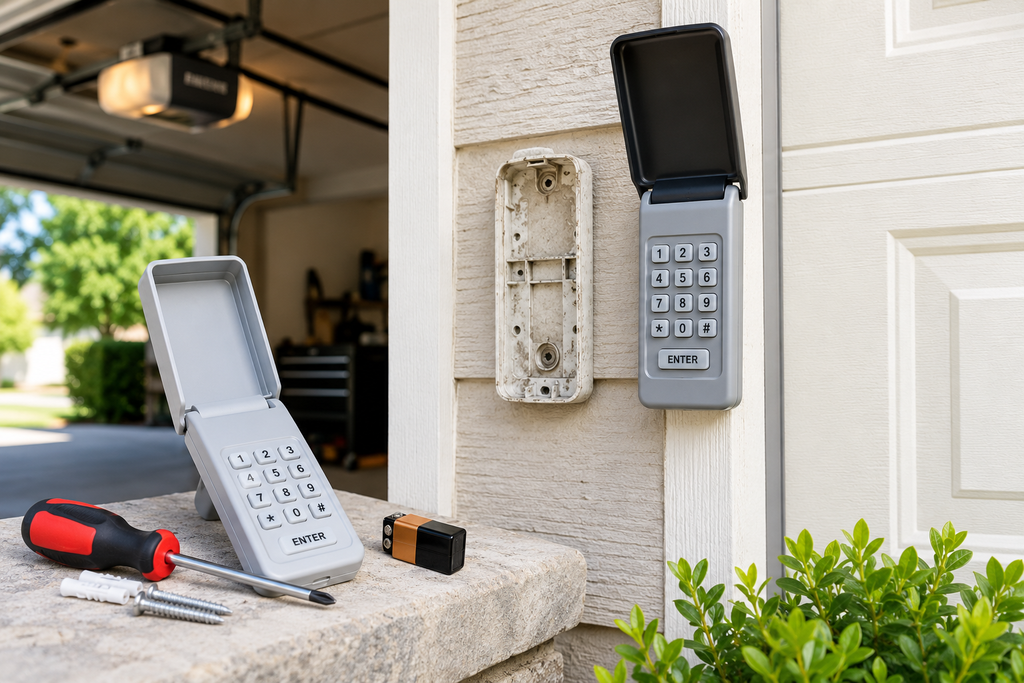
Before installing the new unit, carefully remove the existing keypad. Take note of how the old device is mounted so that the new Garage Door Keypad Replacement can be positioned correctly.
Open the Keypad Cover
Open the protective cover and inspect the keypad for mounting screws or a mounting bracket.
Remove the Battery
If the keypad uses a removable battery, remove it before taking the device off the mounting surface.
Remove the Mounting Hardware
Loosen the screws while supporting the keypad. Keep the mounting hardware available until you have determined whether the new keypad uses the same mounting arrangement.
Inspect the Mounting Surface
Check the wall for damaged anchors, loose screws, or deterioration around the old mounting points. A damaged mounting surface should be addressed before installing the new keypad.
Install the New Keypad
Once the old keypad has been removed, install the new Garage Door Keypad Replacement according to the manufacturer’s mounting instructions.
Position the Keypad
Choose a convenient location where the keypad can be reached easily while remaining clear of moving garage door components.
Secure the Housing
Use the supplied mounting hardware where possible. Avoid overtightening screws because excessive pressure can damage the keypad housing.
Install the Battery
Install the specified battery and observe the positive and negative markings inside the battery compartment.
If you are also servicing the interior control system, you can review the Wall Control Garage Door Opener as another control component.
Check the Cover
Close the keypad cover securely after the battery has been installed. The cover should operate normally without pressing against the buttons.
Program the Garage Door Keypad Replacement
A Garage Door Keypad Replacement is not complete until the keypad has been programmed to communicate with the garage door opener.
The exact programming sequence depends on the keypad and opener. Do not assume that one manufacturer’s procedure applies to another manufacturer’s device.
Locate the Learn or Program Button
Find the Learn, Program, or similar programming control on the opener or receiver. Its location and labeling can vary by model.
Enter Programming Mode
Follow the instructions supplied with the keypad to place the opener and keypad into the appropriate programming mode.
Create or Enter the PIN
Enter the desired PIN according to the keypad’s programming instructions. Some keypads support specific PIN lengths, so follow the requirements for your model.
Complete the Pairing Process
Complete the programming sequence and wait for the keypad or opener to provide the expected confirmation.
Genie’s official universal keypad instructions explain that the opener brand and receiver specifications should be identified before programming and that different opener types can require different procedures. View the official Genie universal keypad programming instructions .
For another wireless control option, review the Sommer 4765V001 Wireless Wall Button and verify the correct opener compatibility before installation.
Create a New PIN
The PIN is an important part of a Garage Door Keypad Replacement because it controls access through the exterior keypad.
- Avoid simple sequential numbers.
- Avoid easily guessed address numbers.
- Do not share the PIN unnecessarily.
- Follow the keypad’s required PIN format.
- Change the PIN if it becomes known to unauthorized people.
After creating the PIN, test it according to the keypad instructions. If the keypad rejects the PIN, verify that the programming procedure was completed correctly.
Test the Garage Door Keypad Replacement
Testing confirms that the Garage Door Keypad Replacement has been installed and programmed correctly.
Enter the PIN
Enter the newly programmed PIN carefully and activate the keypad according to its instructions.
Watch the Garage Door
Make sure the garage door area is clear before operating the door. Observe the complete door movement while testing the replacement keypad.
Repeat the Test
Operate the keypad several times to make sure its response is consistent. One successful activation does not necessarily confirm that the replacement has been completely configured.
Inspect the Installation
Confirm that the keypad remains securely mounted and that its cover and battery compartment are properly closed.
If you work with Wayne Dalton equipment, another control component you can review is the Wayne Dalton 309961 Wall Control .
Troubleshoot Common Garage Door Keypad Problems
If the keypad does not work after installation, check the basic causes before assuming another Garage Door Keypad Replacement is required.
The Keypad Does Not Light Up
Check the battery type, battery orientation, and battery condition. Make sure the battery is fully seated and that the contacts are clean and properly positioned.
The Keypad Lights Up but the Door Does Not Move
The keypad may have power without being correctly programmed. Verify compatibility and repeat the model-specific programming procedure.
The PIN Is Rejected
Make sure the PIN is being entered correctly. If the keypad has been reset or reprogrammed, the previous PIN may no longer be active.
The Keypad Works Only Sometimes
Check the battery, programming, keypad condition, and compatibility. If other garage door controls are also malfunctioning, the opener or receiver may require further diagnosis.
The Replacement Will Not Program
Recheck the exact opener and keypad models. An incompatible keypad cannot be made compatible simply by repeating the programming procedure.
The New Keypad Is Secure but Still Fails
If the keypad is physically secure but does not operate the door, focus on the battery, programming sequence, receiver compatibility, and opener model rather than repeatedly changing the mounting position.
How to Avoid Problems With a Garage Door Keypad Replacement
The easiest way to avoid replacement problems is to identify the opener before purchasing the keypad. The model number provides a much stronger compatibility reference than appearance alone.
It is also useful to keep the manufacturer’s instructions available during installation. Programming procedures can differ substantially between brands and generations.
Another important step is testing the replacement immediately after installation. If the keypad does not work, troubleshooting is easier when the installation is still fresh and the original keypad information is available.
Related Garage Door Products
The following products can be useful when researching garage door wall controls and access-control components. Always verify compatibility with the opener before ordering.
- Genie Series II Wall Console
- 880LMW LiftMaster Smart Control Panel
- LiftMaster 889LM
- LiftMaster Wireless Wall Button
- Marantec 165917 Wireless Wall Control
- Wall Control Garage Door Opener
- Sommer 4765V001 Wireless Wall Button
- Wayne Dalton 309961 Wall Control
Browse LiftMaster Wall Control Parts
For additional wall-control products and related garage door opener components, browse the LiftMaster Wall Control category.
Related Garage Door Articles
Continue learning about garage door remotes, keypads, programming, batteries, and wall controls with these related articles:
- How to Program Garage Door Remote
- Garage Door Remote Replacement
- Garage Door Remote Battery
- LiftMaster Remote Programming
- How to Program Genie Garage Door Remote
- Genie Keypad Programming
- LiftMaster Wall Control Replacement
Frequently Asked Questions
How do I know if I need a Garage Door Keypad Replacement?
Check the battery, programming, and opener compatibility first. If the keypad has physical damage, worn buttons, or persistent operating problems after troubleshooting, a Garage Door Keypad Replacement may be appropriate.
Can I replace a garage door keypad myself?
Many wireless keypads can be replaced by following the manufacturer’s mounting and programming instructions. The exact process depends on the keypad and opener models.
Does a replacement keypad need to be programmed?
Usually, yes. A new keypad normally needs to be programmed or paired with the garage door opener before it can operate the door.
Can I use any universal garage door keypad?
No. Universal keypads still support specific opener brands and technologies. Check the compatibility list before purchasing.
Should I replace the battery before replacing the keypad?
Yes. Installing the correct fresh battery is a useful first troubleshooting step and may resolve a keypad that appears to be defective.
Why does my new keypad light up but not open the door?
The keypad may have power without being correctly programmed. Verify compatibility and complete the manufacturer’s programming procedure.
Can I use my old PIN with the new keypad?
That depends on the keypad. Some systems allow an existing PIN to be configured, while others require a new PIN during programming.
What should I check if the replacement keypad will not program?
Check the keypad model, opener model, battery, compatibility information, and programming instructions. If the models are compatible and programming still fails, the opener receiver or keypad may require further diagnosis.
Final Thoughts on Garage Door Keypad Replacement
A successful Garage Door Keypad Replacement starts with identifying the correct garage door opener and selecting a compatible keypad. Taking time to verify those details can prevent unnecessary installation and programming problems.
Once the replacement has been selected, install it securely, follow the manufacturer’s programming instructions, create an appropriate PIN, and test the keypad several times before relying on it for everyday garage access.
If the replacement does not operate correctly, return to the basic checks: battery condition, compatibility, PIN entry, programming, and opener operation. These checks can help determine whether the problem is actually the keypad or another part of the garage door system.
For additional garage door wall controls, browse the LiftMaster Wall Control category.

Pingback: LiftMaster Wall Control Replacement: 7 Steps for a Better