
Uncategorized
Gate Operator Keypad
Sep
Gate Operator Keypad
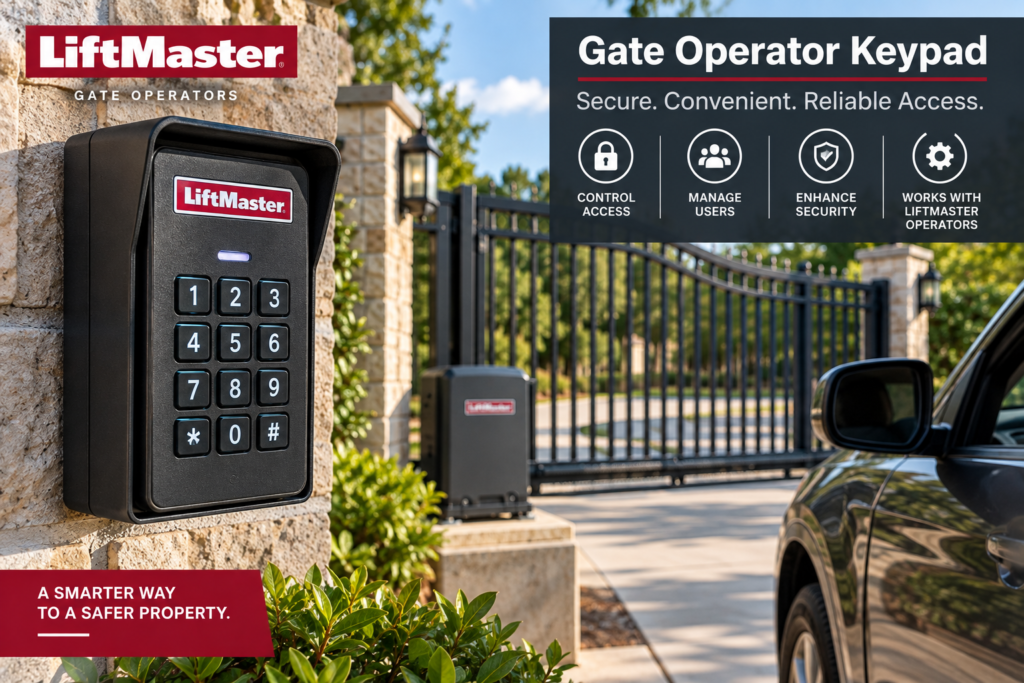
A gate operator keypad provides a convenient way to control access through an automated gate using a programmed code. Instead of relying only on a remote control, a keypad can allow an authorized user to enter a PIN at the gate and send an access command to the gate operator or access-control system.
The right gate operator keypad depends on the gate system, operator, access-control arrangement, installation environment, and features required. Some keypads are designed for standalone access control, while others communicate with a separate controller or gate operator.
This guide explains how gate keypads work, what to consider before choosing one, installation considerations, PIN management, outdoor use, troubleshooting, maintenance, and how keypads fit into a larger automatic gate access system.
For available gate operators and related equipment, visit our Gate & Fence Operators category.

Gate Operator Keypad: How It Works
A gate operator keypad is an input device that allows a user to enter a credential, usually a PIN, to request access through a gate.
LiftMaster’s current access-control buyer’s guide describes a keypad as one type of user input device. The input can be compared with programmed credentials, and the access-control system can then activate the gate operator when the credential is authorized. Read LiftMaster’s Access Control Systems Buyer’s Guide.
The exact architecture varies between systems. A keypad may communicate directly with an operator or may work through a separate access controller.
| Component | Function |
|---|---|
| Keypad | Accepts a user’s PIN or other credential. |
| Access controller | Processes credentials and determines whether access should be granted. |
| Gate operator | Moves the gate after receiving the appropriate command. |
| Power supply | Provides power to the applicable access-control equipment. |
| Safety equipment | Helps protect people and property around the automated gate. |
1. Choose the Right Gate Operator Keypad
The first step is determining what type of gate operator keypad the installation requires.
Consider whether the keypad will be used for a residential driveway, commercial entrance, gated community, industrial property, or another application. The number of users, required access features, wiring availability, weather exposure, and existing operator or controller should all be considered.
Do not select a keypad based only on appearance. Verify that the keypad is appropriate for the access-control system before purchasing it.
LiftMaster’s current access-control range includes keypad systems for different applications. Its KPW5 wireless keypad, for example, is listed for small residential communities and provides permanent and temporary PIN functionality. View the official LiftMaster KPW5 keypad information.
2. Decide Between Wired and Wireless Access
One of the major decisions when selecting a gate operator keypad is whether a wired or wireless installation is more appropriate.
A wired keypad requires a physical connection to the applicable access-control equipment or operator. This can provide a direct connection but may require conduit, cable routing, trenching, or other installation work depending on the site.
A wireless keypad can reduce the need for certain wiring runs, but the wireless system still needs to be compatible with the intended operator or access-control system.
LiftMaster’s current KPW5 product information describes wireless installation as an option that can avoid the need to run additional wires to the keypad. Check the official KPW5 specifications.

3. Check Keypad Compatibility
Compatibility should be verified before connecting a keypad to a gate operator.
Different operators and access-control systems can use different communication methods, programming procedures, input configurations, and security technologies.
A keypad designed for one access-control platform should not automatically be assumed to work with another platform.
Check the manufacturer’s documentation for the keypad and the operator or controller before installation.
For example, LiftMaster’s KPW5 product page states specific compatibility information for its intended LiftMaster systems. This illustrates why the manufacturer’s documentation should be checked rather than relying on a generic compatibility claim.
4. Consider the Number of Users
The number of people who need access can affect the type of gate operator keypad that makes sense for an installation.
A small residential property may only require a limited number of PINs, while a business, apartment community, or commercial facility may need a larger user database or a more sophisticated access-control platform.
Consider who needs access, how credentials will be assigned, whether temporary codes are required, and how credentials will be removed when access is no longer authorized.
Some access-control systems can support more advanced credential management than a simple standalone keypad.
5. Plan PIN Management
A keypad is only useful as an access-control device if its credentials are managed appropriately.
Use unique codes where the system supports them rather than giving every user the same permanent PIN. When someone should no longer have access, remove or change the applicable credential according to the system’s programming instructions.
Temporary access can also be useful for contractors, visitors, maintenance personnel, or other users who should only have access for a limited period.
LiftMaster’s KPW5 product information, for example, describes permanent and temporary PIN functionality on the applicable product. Review the manufacturer’s KPW5 access features.
Gate Operator Keypad Installation Considerations
Installing a gate operator keypad involves more than attaching the keypad to a post or wall. The installation location should allow authorized users to enter their credentials conveniently while keeping the equipment appropriately positioned for the gate system.
Consider the approach direction, vehicle position, pedestrian access, visibility, weather exposure, cable routing, power requirements, and access to the keypad for future service.
The keypad should not be positioned where users are forced to stand in an unsafe area while the gate moves.
For wired systems, plan the cable route before installation. Depending on the site, this may involve conduit, underground cable routing, junction boxes, or other electrical installation requirements.
Follow the manufacturer’s installation instructions for the exact keypad and access-control system.
Keypad Placement at a Gate
Placement affects both convenience and safety. A driver should be able to approach the keypad without positioning a vehicle in an unsafe location.
Pedestrian access should also be considered where people enter through the same gate system.
The keypad should remain accessible without interfering with the gate’s opening and closing path.
Outdoor installations should also take environmental exposure into account. Weather-resistant equipment can be appropriate where the keypad is exposed to rain, dust, temperature changes, or other outdoor conditions.

Wired Gate Operator Keypad Installation
A wired gate operator keypad requires an appropriate connection between the keypad and the access-control equipment.
The exact wiring method depends on the keypad, controller, and gate operator. Do not assume that the terminals on one keypad have the same function as those on another device.
Use the wiring diagram supplied for the exact system.
Where wiring requires electrical work, use a qualified professional when the work exceeds your knowledge or local requirements.
Proper cable protection is also important for outdoor installations. The wiring should be routed and protected according to the applicable installation requirements.
Wireless Gate Operator Keypad Installation
A wireless gate operator keypad can simplify certain installations by reducing the need for a physical communication cable between the keypad and the compatible receiving equipment.
However, wireless does not mean that compatibility can be ignored. The keypad must communicate using a technology supported by the applicable operator or access-control system.
Wireless range can also be affected by the installation environment, building materials, metal structures, interference, and equipment placement.
Follow the manufacturer’s setup and programming instructions rather than assuming that a generic wireless pairing procedure will work.
Programming a Gate Operator Keypad
Programming procedures vary significantly between keypad models.
Some systems allow PINs to be programmed directly at the keypad, while other systems use a separate controller or management platform.
Before programming, identify the exact keypad model and read its instructions.
LiftMaster’s KPR2000 documentation, for example, describes a keypad and proximity-reader system that can operate as a standalone access-control system or work in a pass-through configuration with an external controller. View the official LiftMaster KPR2000 documentation.
This is another reason not to assume that every keypad uses the same programming process.
Gate Operator Keypad Security
Access credentials should be treated as security information. Avoid sharing permanent codes unnecessarily, and remove credentials when users no longer require access.
For larger properties, consider an access-control system that provides centralized credential management, user records, schedules, or other management functions where appropriate.
LiftMaster’s current access-control buyer’s guide explains that an access-control system can compare a user’s credential with programmed information before allowing a gate operator to activate. Explore LiftMaster’s access-control guide.
Gate Operator Keypad Troubleshooting
When a keypad does not activate the gate, start with the simplest possible causes.
| Problem | Possible Area to Check |
|---|---|
| Keypad has no response | Power, battery, wiring, or keypad condition |
| PIN is rejected | Programming, credential, or access settings |
| PIN works but gate does not move | Operator, controller, safety devices, or gate condition |
| Wireless keypad loses communication | Compatibility, power, range, interference, or receiver |
| Some users can enter | Credential or programming issue affecting specific users |
When troubleshooting a gate operator keypad, first determine whether the keypad itself is functioning or whether the problem occurs after the keypad sends the access command.
If the keypad accepts the correct credential but the gate does not respond, the issue may involve the controller, operator, safety system, or gate rather than the keypad.
If the keypad itself does not respond, investigate its power, battery, wiring, programming, or hardware according to the manufacturer’s instructions.
Gate Operator Keypad and Safety
A keypad controls access, but it does not replace the safety equipment required for an automated gate.
The gate operator should still have the appropriate entrapment-protection equipment and should be installed and maintained according to the manufacturer’s instructions and applicable requirements.
LiftMaster’s current gate resources include safety information and access-control products designed to work as part of complete automated gate systems. Review LiftMaster’s commercial gate operator resources.
Never use a keypad installation as a reason to bypass safety devices or alter the operator’s safety functions.
Maintaining a Gate Operator Keypad
Regular inspection can help identify problems before the keypad becomes unusable.
Check the keypad housing, buttons, display or indicators where applicable, wiring, mounting hardware, and weather seals.
For battery-powered wireless keypads, monitor battery condition according to the manufacturer’s recommendations.
Keep the keypad clean and accessible without using harsh cleaning methods that could damage the equipment.
Inspect the surrounding area as well. Vegetation, dirt, water accumulation, or physical damage can affect an outdoor access-control installation.
Gate Operator Keypad for Residential Applications
Residential installations often use keypads to provide convenient access without requiring every household member to carry a remote.
A residential gate operator keypad can be useful for family members, trusted visitors, service providers, or other authorized users.
Consider the number of users and whether temporary credentials are useful. A simple keypad may be sufficient for a small property, while larger residential communities may benefit from more advanced access-control management.
LiftMaster’s residential gate resources include automated swing and slide gate operators as well as access-control technology. View LiftMaster residential gate operator resources.
Gate Operator Keypad for Commercial Applications
Commercial applications can require more sophisticated access management because many employees, contractors, visitors, and vehicles may need controlled access.
A commercial gate operator keypad can be used as one part of a larger access-control system.
For a larger facility, consider whether the system needs multiple entry points, centralized credential management, schedules, event records, remote management, or additional authentication methods.
LiftMaster’s current access-control systems include keypad-based input devices as well as smart readers and other access technologies. Explore LiftMaster access-control systems.
Choosing a Keypad for an Existing Gate Operator
If you already have an automatic gate operator, identify its exact model before buying a new keypad.
Then identify the access-control technology used by the operator and determine which keypad options the manufacturer supports.
Do not assume that a keypad will work simply because it is advertised as an automatic gate keypad.
Check the manufacturer’s documentation for compatibility, programming, wiring, power, and environmental requirements.
Related Gate Operator Resources
Continue researching automatic gate systems with these related guides:
- Gate Opener Battery — Learn about gate operator batteries and backup power.
- LiftMaster Gate Opener Manual — Find and use model-specific LiftMaster documentation.
- LiftMaster Gate Opener Installation — Installation planning, mounting, wiring, safety, and testing.
- LiftMaster Gate Opener Troubleshooting — Troubleshooting common LiftMaster operator problems.
- Heavy Duty Swing Gate Opener Guide — Factors to consider when researching heavy-duty swing gate systems.
Gate Operator Products to Consider
If you are researching equipment for a new or existing gate system, these Garage Door Operator Direct product pages provide additional options:
Frequently Asked Questions
What is a gate operator keypad?
A gate operator keypad is an access-control input device that allows an authorized user to enter a PIN or other credential to request access through an automated gate.
How does a gate operator keypad work?
The keypad receives a credential and communicates with the applicable operator or access-control system. If the credential is authorized, the system can send a command to activate the gate operator.
Can any keypad work with any gate operator?
No. Compatibility depends on the keypad, operator, controller, communication method, programming system, and other equipment. Always verify compatibility using manufacturer documentation.
Are wireless gate keypads better than wired keypads?
They serve different installation needs. Wireless systems can reduce certain wiring requirements, while wired systems can provide a direct physical connection. The appropriate choice depends on the site and compatible equipment.
Can I use a keypad instead of a remote?
A keypad can provide an alternative access method, but whether it can replace a remote depends on the gate operator and access-control system.
How many PINs can a gate keypad store?
The number varies by keypad model. Some basic systems support a limited number of credentials, while more advanced access-control systems can manage substantially larger user databases.
Can a gate keypad have temporary PINs?
Some keypad systems support temporary credentials. For example, certain LiftMaster keypad products provide permanent and temporary PIN functionality. Check the specifications of the exact keypad.
Where should a gate keypad be installed?
The keypad should be positioned so authorized users can operate it conveniently while remaining clear of the gate’s movement path. The exact mounting requirements depend on the equipment and site.
Why does my gate keypad accept the PIN but not open the gate?
The keypad may be accepting the credential correctly while the problem exists elsewhere in the system. Check the controller, operator, safety devices, wiring, and gate condition according to the applicable documentation.
How do I maintain a gate operator keypad?
Inspect the keypad housing, buttons, mounting, wiring, power source, and surrounding environment. For wireless models, check the battery according to the manufacturer’s instructions.
Final Takeaway
A gate operator keypad can make automated gate access more convenient by allowing authorized users to enter a PIN instead of relying exclusively on a remote control.
The most important considerations are compatibility, access requirements, installation method, user management, environmental conditions, security, and safety. A keypad should be treated as one component of the complete automated gate system rather than as an isolated device.
Before purchasing or installing a keypad, identify the exact gate operator and access-control equipment and verify the manufacturer’s requirements. For additional information, browse our Gate & Fence Operators category or continue with our LiftMaster Gate Opener Installation guide.

Pingback: Residential Gate Operator Installation: 7 Reliable Setup