
Uncategorized
Garage Door Sensor Wiring Diagram
Oct
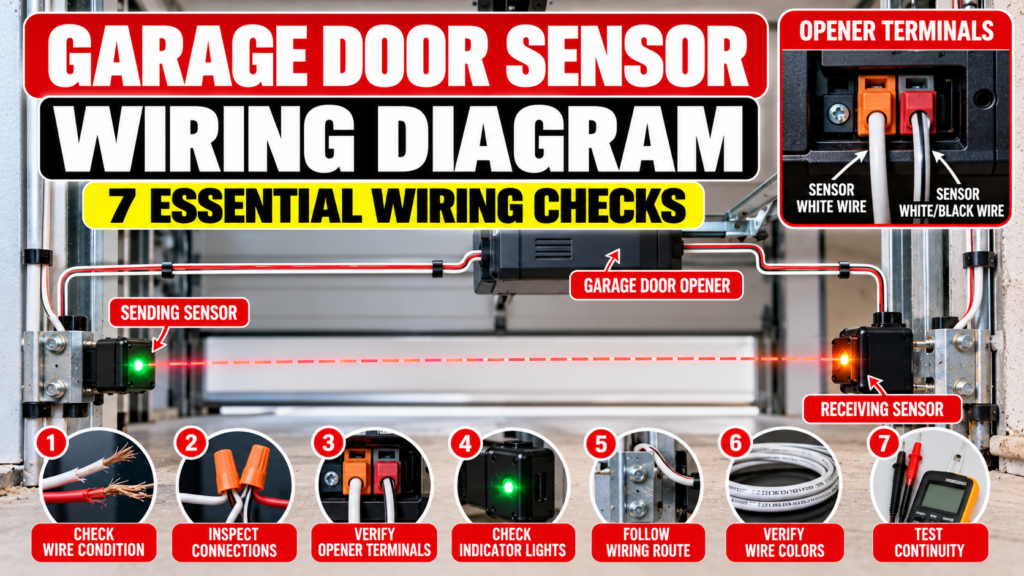
Garage Door Sensor Wiring Diagram: 7 Essential Wiring Checks
A garage door sensor wiring diagram can be useful when a garage door opener refuses to close, shows a sensor-related warning, or appears to have a problem with the safety sensors. The wiring connects the sensors to the opener’s control system, allowing the opener to monitor the safety circuit during operation.
However, sensor wiring is not identical across every garage door opener. Wire colors, terminal locations, connectors, sensor designs, and installation procedures can vary by manufacturer and model. A wiring diagram should therefore be used as a guide to understanding the system, not as permission to connect wires according to a generic color code.
This guide explains how garage door safety sensor wiring generally works, what to look for when inspecting the wiring, how to recognize common symptoms, and when manufacturer-specific documentation or professional assistance is appropriate.
Important: Always verify the wiring arrangement for your exact garage door opener model. Do not assume that wire colors or terminal labels from another opener apply to yours.
Table of Contents
- Garage Door Sensor Wiring Basics
- Garage Door Sensor Wiring Diagram Explained
- How the Sensor Wiring Path Works
- 7 Essential Wiring Checks
- Understanding Sensor Wire Colors
- Understanding Opener Terminals
- Common Wiring Symptoms
- Garage Door Sensor Wiring Troubleshooting
- Common Wiring Mistakes
- Garage Door Openers and Opener Parts
- Sensor Wiring Maintenance
- Safety Information
- Related Articles
- Frequently Asked Questions
- Conclusion
Garage Door Sensor Wiring Basics
Safety sensors are part of the entrapment-protection system used by many automatic residential garage door openers. The sensors are normally installed near the lower portion of the garage door tracks, facing each other across the opening.
The wiring provides the electrical connection between the safety sensors and the opener. Depending on the system, the wiring may run directly between the sensor locations and the opener or through pre-installed wiring in the garage.
When examining a garage door sensor wiring diagram, it is important to separate three different things: the sensor itself, the wiring connecting the sensor, and the terminals or connections on the opener.
A problem anywhere along this path can produce symptoms that look like a defective sensor.
Basic Sensor Wiring Concept
Sensor wires
Garage wiring path
Opener terminals / sensor connection
Garage wiring path
Sensor wires
This simplified representation is not a model-specific wiring schematic. It is intended to explain the relationship between the components before you inspect the actual documentation for your opener.
Garage Door Sensor Wiring Diagram Explained
The purpose of a garage door sensor wiring diagram is to show where the sensor wires connect and how the safety-sensor circuit is arranged.
For example, a current LiftMaster installation manual shows a safety reversing sensor installation in which the sensor wires are connected to the opener using designated terminals. The manual also provides an example of connecting pre-installed wires to the sensor wiring.
That example demonstrates why generic internet wiring diagrams should be used carefully. The exact terminal arrangement and wire identification must be taken from the documentation for the particular opener.
Some manufacturers also provide replacement sensor kits with model-specific installation instructions. LiftMaster and Chamberlain, for example, publish safety sensor product information and installation documentation for applicable systems.
Therefore, the most reliable diagram is the one supplied for the exact opener model being serviced.
How the Sensor Wiring Path Works
Although designs vary, the sensor wiring path can be understood in several basic stages.
1. Sensor connection
Each safety sensor has electrical connections that allow it to communicate with the garage door opener’s control system.
2. Wire route
The sensor wires travel from the sensor location toward the opener. In some installations, existing wires may already be routed through the garage.
3. Splices or connectors
Some installations use connections between the sensor wiring and pre-installed wiring. Any connector or splice must be made according to the manufacturer’s instructions.
4. Opener connection
The wires ultimately connect to the designated sensor terminals or connector on the opener.
5. Sensor monitoring
The opener monitors the safety system during operation. If the expected safety-sensor condition is not detected, the opener may prevent closing or behave differently.
The CPSC’s garage door operator requirements specifically address external entrapment-protection devices and require monitoring of the device, including its wiring, in applicable systems.
7 Essential Wiring Checks
1. Check for visibly disconnected wires
Begin with a visual inspection. Look for wires that are obviously disconnected from their intended connection point.
A disconnected wire can produce symptoms that resemble a failed sensor. However, do not reconnect a wire based only on its color. Confirm the correct connection using the opener’s manual.
2. Look for damaged insulation
Inspect accessible wiring for cuts, crushed sections, exposed conductors, or other visible damage.
Sensor wiring is often routed near walls, tracks, and other garage components. It can be disturbed by storage equipment, tools, remodeling work, or accidental impact.
3. Check the wire route
A garage door sensor wiring diagram can help you understand the intended route, but the actual installation should be compared with the manufacturer’s instructions.
Look for sections where the wire may have been pulled, pinched, sharply bent, or placed where it can be damaged by moving equipment.
4. Inspect accessible connections
If the system uses connectors or approved wire nuts, inspect the accessible connection points for obvious problems.
Do not dismantle electrical connections unnecessarily. If a connection needs to be rebuilt, use the exact procedure and materials specified by the manufacturer.
5. Check sensor indicators
Many garage door sensor systems have indicator lights. These lights can help identify whether a sensor is receiving power or whether the system is detecting a condition that needs attention.
Indicator behavior differs between systems, so use the manual for the exact opener instead of assuming that a particular light color means the same thing on every model.
6. Check the opener’s sensor connection
The wiring must ultimately connect to the appropriate sensor terminals or connector on the opener.
If you suspect a terminal problem, identify the exact terminal designation from the opener’s documentation. Do not move wires between terminals simply to test different combinations.
7. Compare the installation with the model manual
This is one of the most important steps when using a garage door sensor wiring diagram.
Find the exact opener model number and obtain the corresponding owner’s or installation manual. Compare the sensor wiring arrangement, terminal identification, and recommended installation method with the actual system.
Understanding Sensor Wire Colors
Wire color is useful for identification, but it should not be treated as a universal wiring standard for every garage door opener.
For example, the LiftMaster 8164W installation documentation provides a specific example involving white and white/black sensor wires and corresponding opener terminals. It also describes an example involving pre-installed wires and specified terminal connections.
That does not mean every garage door opener uses the same colors or terminals.
When reviewing a garage door sensor wiring diagram, check all of the following:
- The exact opener model number.
- The manufacturer’s wiring diagram.
- The sensor part number when available.
- The terminal labels on the opener.
- The documented wire colors.
- Whether the installation uses pre-installed wiring.
Do not rely on color alone. A white wire on one opener does not automatically belong on the same terminal as a white wire on another model.
Understanding Opener Terminals
The opener’s terminals provide the connection point for the safety-sensor circuit. Their location and labeling depend on the opener design.
Some openers use a terminal block with clearly marked connections. Others may use connectors or a different wiring arrangement.
When working from a garage door sensor wiring diagram, identify the terminals by their documented labels rather than guessing from their physical position.
A manufacturer installation manual may also show how to insert or remove wires from a terminal. For example, the LiftMaster documentation describes a terminal connection procedure as part of its safety reversing sensor installation.
If the terminal arrangement in your opener does not match the diagram you are viewing, stop and locate the correct documentation instead of adapting the diagram yourself.
Common Wiring Symptoms
Sensor wiring problems can produce several different symptoms. None of these symptoms, by itself, proves that the wiring is defective.
| Symptom | Possible Area | What to Check |
|---|---|---|
| Door will not close normally | Sensor system | Check obstruction, alignment, indicators, wiring, and model-specific diagnostics. |
| One sensor indicator is off | Power or wiring | Compare the condition with the opener manual. |
| Problem began after garage work | Wiring route | Inspect accessible wiring for disturbance or damage. |
| Sensor appears physically intact but system reports a fault | Connection or sensor circuit | Follow the manufacturer’s diagnostic procedure. |
| Problem occurs intermittently | Connection, wiring, alignment, or environment | Document when the fault occurs and inspect the system carefully. |
| Visible wire damage | Sensor wiring | Do not guess at repairs; use the correct repair procedure. |
Garage Door Sensor Wiring Troubleshooting
When a garage door sensor wiring diagram is being used for troubleshooting, work from the simplest possibilities toward more involved diagnosis.
Start with the sensor area
Make sure nothing is blocking the sensor path. Check for dirt, cobwebs, physical damage, or a sensor bracket that appears to have moved.
If the problem is actually caused by alignment or contamination, changing wiring will not solve it.
Observe the indicator lights
Record what each sensor is showing before changing anything. The manufacturer’s diagnostic information can then be used to interpret those indicators.
Inspect accessible wiring
Look for obvious damage or disconnection without pulling on wires or dismantling components.
Identify the exact opener
Find the model number on the opener. This is critical because different models can use different sensor systems and wiring arrangements.
Use the manufacturer’s documentation
LiftMaster and Chamberlain both publish documentation for applicable safety sensor systems. Their official parts pages also identify sensor kits and provide installation-support information for supported products.
If your opener is another brand, obtain the documentation directly from that manufacturer.
Common Wiring Mistakes
Using a generic diagram for a different opener
A diagram from another model may look almost identical while using different terminals or wiring requirements.
Assuming wire colors are universal
Wire colors should always be confirmed against the documentation for the specific opener.
Moving wires randomly
Randomly changing terminal connections can create additional problems and may damage components.
Replacing sensors before checking wiring
A new sensor will not necessarily correct a damaged or incorrectly connected wire.
Bypassing the safety system
Never bypass the safety sensors simply because the garage door will not close. The safety system exists to provide entrapment protection.
Garage Door Openers and Opener Parts
Garage Door Openers
If your existing opener is being replaced rather than repaired, browse the available Garage Door Openers.
Before purchasing an opener, compare the product information with your garage door, installation requirements, and intended application.
Garage Door Opener Parts
For replacement components, visit Garage Door Opener Parts.
When replacing a sensor or another opener component, verify the exact model and applicable part information before ordering. Product appearance alone is not sufficient evidence of compatibility.
Sensor Wiring Maintenance
Routine visual inspection can help identify obvious wiring problems before they become more difficult to diagnose.
- Keep the sensor area clear of stored objects.
- Keep sensor lenses clean.
- Do not place equipment against accessible wiring.
- Watch for damaged insulation.
- Check for signs of impact around sensor brackets.
- Keep the opener’s model and manual information available.
- Address recurring sensor faults instead of bypassing the system.
A maintenance check does not mean repeatedly disturbing the wiring. If the system is operating normally, unnecessary wire movement can create problems rather than prevent them.
Garage Door Sensor Wiring Safety
Safety warning: Garage door openers contain electrical components and operate heavy moving doors. Incorrect wiring or bypassing safety equipment can create serious hazards.
- Do not bypass the safety sensors.
- Do not connect wires to random terminals.
- Do not assume wire colors are universal.
- Follow the exact manufacturer’s installation instructions.
- Disconnect power only when the manufacturer’s instructions call for it and when doing so can be done safely.
- Do not work on garage door springs or cables as part of a sensor-wiring repair.
- Seek qualified assistance when electrical troubleshooting is beyond your experience.
The U.S. Consumer Product Safety Commission identifies external entrapment-protection devices as an important part of applicable automatic residential garage door operator requirements. The CPSC materials also address monitoring of external protection devices and their wiring.
That makes correct sensor operation more than a convenience issue. If the safety circuit is reporting a fault, the cause should be diagnosed and corrected rather than bypassed.
For additional official information, review the CPSC garage door operator safety information.
For manufacturer-specific wiring information, use the documentation supplied for your exact opener model. For example, LiftMaster publishes safety sensor kits and installation information for applicable products.
Related Articles
Frequently Asked Questions
1. What is a garage door sensor wiring diagram?
A garage door sensor wiring diagram shows how the safety sensors connect to the garage door opener and identifies the relevant wiring or terminals for a particular system. The exact diagram should come from the manufacturer or the manual for the specific opener model.
2. Are garage door sensor wire colors universal?
No. Wire colors and terminal arrangements can vary between manufacturers and models. Use the exact wiring information for your opener rather than assuming a color has the same function across different systems.
3. Can damaged sensor wiring stop a garage door from closing?
Yes. A problem in the safety-sensor circuit can prevent normal closing behavior on systems that monitor the external entrapment-protection device. Other issues, such as alignment or an obstruction, can create similar symptoms.
4. How do I find the correct wiring diagram for my garage door opener?
Find the exact model number on the opener and then use the manufacturer’s owner’s or installation manual. Manufacturer documentation is preferable to a generic diagram because it identifies the wiring and terminals for the applicable system.
5. Can I connect garage door sensor wires by matching colors?
You should not connect wires solely by color. Confirm the connection using the manufacturer’s wiring information for the exact opener and sensor system.
6. Why are my garage door sensor lights not working after checking the wires?
The cause could involve power, wiring, the sensor itself, alignment, or another system condition. Check the opener’s model-specific diagnostic procedure before assuming that the sensor needs replacement.
7. Should I replace the sensors if the wiring looks damaged?
Not necessarily. Damaged wiring and a defective sensor are different problems. Identify the damaged component and follow the manufacturer’s repair or replacement instructions. Verify compatibility before ordering any replacement part.
8. Can I bypass garage door sensors to make the door close?
No. The safety sensors should not be bypassed or disabled. If the sensor system is not operating correctly, diagnose the cause using the manufacturer’s instructions or obtain qualified professional assistance.
Conclusion
A garage door sensor wiring diagram is most useful when it is matched to the exact garage door opener being serviced. Although the general concept is straightforward, the actual wire colors, terminals, connectors, and installation methods can vary considerably.
When troubleshooting, begin with simple checks such as obstructions, dirty sensors, visible damage, and indicator lights. Then inspect accessible wiring and connections without guessing or randomly moving wires.
If the wiring arrangement does not match a generic diagram, stop and locate the manufacturer’s documentation for the exact opener model. This approach reduces the risk of creating a new wiring problem while attempting to solve an existing one.
When a replacement component is needed, browse Garage Door Opener Parts and verify the exact model and compatibility information before ordering. If the complete opener needs replacement, see Garage Door Openers.
Most importantly, never bypass the safety system simply to restore normal door operation. Correct diagnosis, manufacturer-specific information, and safe installation should come before returning the opener to service.
